Connectivity
Configure network access for the Platform Orchestrator and runners, including required IP addresses and port configurations.
Network administrators and platform engineers need to configure connectivity between the Humanitec Platform Orchestrator and your infrastructure. This page provides the IP addresses and connectivity requirements necessary for firewall rules, network security groups, and other network access controls.
Orchestrator IPs
Endpoint IPs
The public endpoint IPs for accessing the Orchestrator are:
34.128.156.4
This IP address resolves to:
console.humanitec.dev- The Humanitec web consoleapi.humanitec.dev- The Humanitec API endpoint
Source IPs
The Orchestrator initiates connections from the following source IPs:
35.198.140.11435.246.198.96
Configure your firewall rules to allow traffic from both IP addresses to ensure uninterrupted connectivity.

Runner network requirements
General connectivity
Runners require network connectivity to all external services they interact with during deployment execution. This includes:
- Cloud provider APIs (AWS, GCP, Azure)
- Kubernetes cluster API servers
- Container registries
- Storage services (S3 buckets, Azure Blob Storage, etc.)
- Any custom APIs or services referenced in your Resource Definitions
For example, a runner deploying to an AWS environment needs network access to the AWS API endpoints for services like EKS, S3, and IAM.
Runner image registry access: All runners must have egress access on TCP port 443 to pull the runner container image from its registry. The specific registry depends on your runner configuration. See runner image for details.
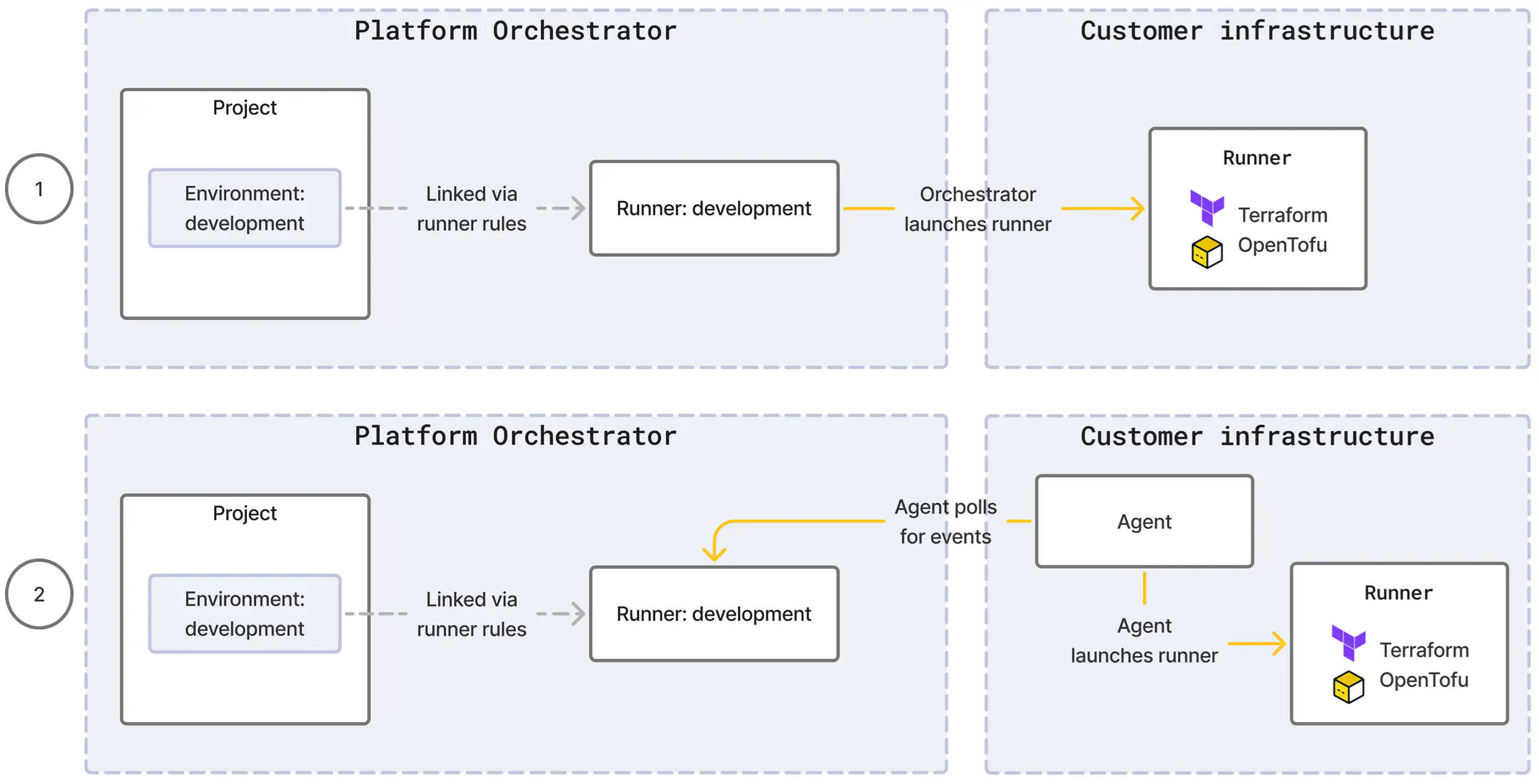
For each runner type, the Orchestrator will either launch runners itself or make use of an agent component to do so.
Direct: If the target compute for the runner execution is reachable for the Orchestrator, it can create a runner itself. This is true e.g. for runner types using a cloud-based service where the cloud API is publicly accessible, and shown as scenario (1) in the diagram below.
Agent: If the target compute for the runner execution is not reachable for the Orchestrator, the runner type comes with an agent which you install in your infrastructure. The agent creates an outbound, encrypted channel to the Orchestrator and continuously polls for deployment events. For each event, the agent launches a runner and relays the results back to the Orchestrator. This is shown as scenario (2) in the diagram below.
Direct
For a direct runner, you must configure ingress from the Orchestrator source IPs to the target infrastructure where the runner will execute.
For example, a kubernetes-gke runner requires ingress access from the Orchestrator source IPs to the GKE cluster’s API server (typically on TCP port 443) so the Orchestrator can create runner jobs in the cluster.
Agent
For an agent runner, you must configure egress from the system hosting the agent component to the Orchestrator endpoint IPs on TCP port 443. The agent maintains a persistent, outbound-only connection to the Orchestrator, eliminating the need for inbound firewall rules.
For example, a kubernetes-agent runner requires egress access from the cluster nodes (where the agent pod runs) to the Orchestrator endpoint IPs.