Observability
Relevant tools (dashboards): Grafana, Power BI, Better Stack, OpenSearch, and others
Relevant tools (portals): Backstage, Cortex, Port, Cycloid, and others
The Platform Orchestrator is a vital source of truth for your platform observability.
Integrations overview
The Orchestrator plays a central part in your Internal Developer Platform by being the go-to place for managing deployments and providing insights into deployment and rollout states of applications and infrastructure.
Orchestrator integrations can be structured along the core aspects represented by each box in the big picture below, with popular tools serving each aspects.
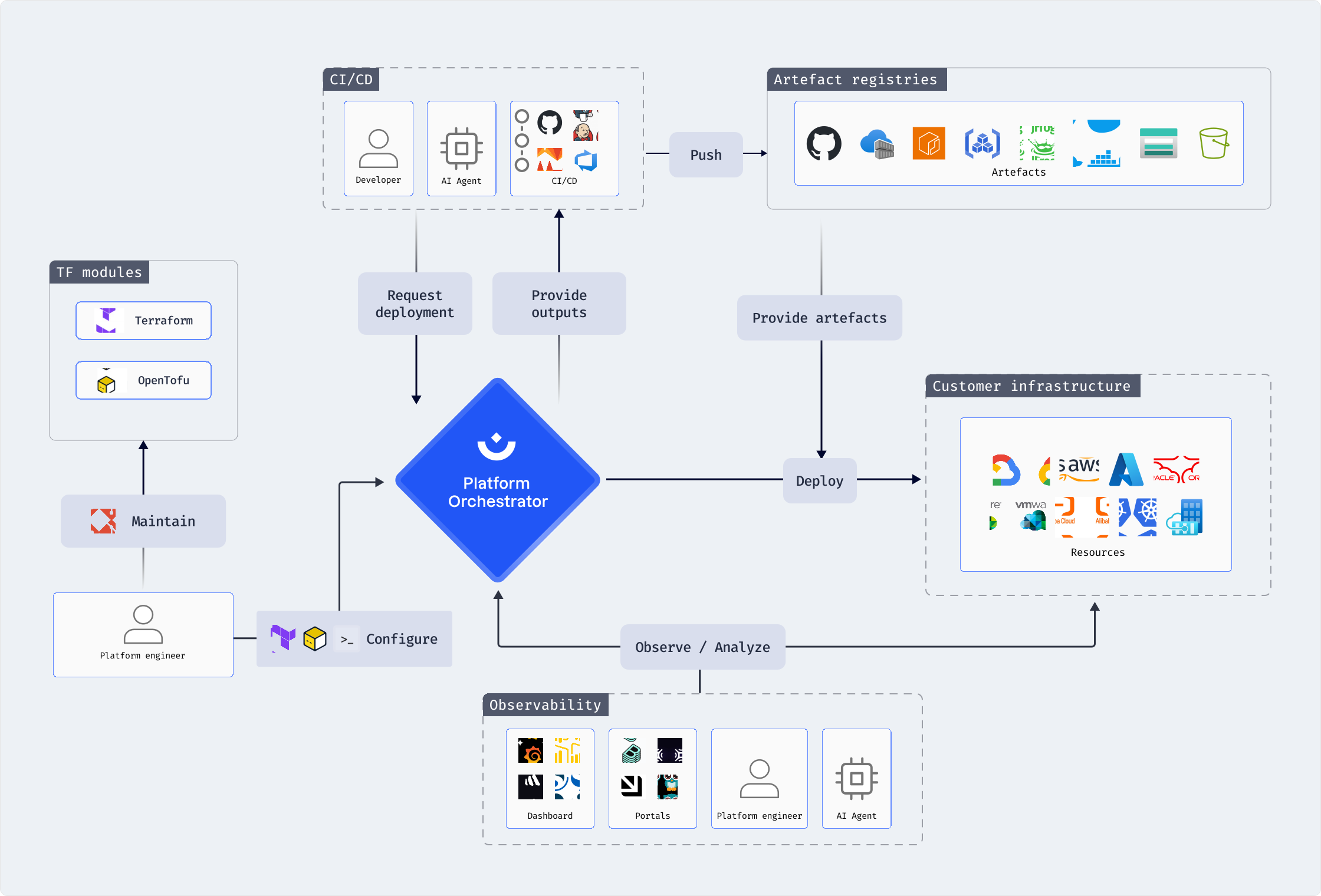
Observability tooling
Dashboard-like observability tools may retrieve data from the Platform Orchestrator for display, aggregation, and analysis purposes.
Portal-like tools may additionally modify objects in the Orchestrator on behalf of users, such as the creation of new projects or environments.
The Orchestrator API provides the endpoint for all integrations. A number of examples are shown below. The exact approach for creating an integration depends on your tooling of choice. We therefore use the universal curl command to illustrate the usage of API endpoints with the API token set as an environment variable HUMANITEC_TOKEN.
Provide an API token
To integrate an observatility tool with the Orchestrator API, create a service user API token with the appropriate privileges, and make it available to your observability tool.
Query Orchestrator data
The following examples illustrate the querying of Orchestrator data. Consult the Orchestrator API to see the full spectrum of endpoints and schema definitions.
Example: Get all environments of a project
curl https://api.humanitec.dev/orgs/{org_id}/projects/{project_id}/envs \
  -X GET \
  -H "Authorization: Bearer ${HUMANITEC_TOKEN}"
Example: Get all active resources of an environment
curl "https://api.humanitec.dev/orgs/{org_id}/active-resources?project_id={project_id}&env_id={env_id}" \
  -X GET \
  -H "Authorization: Bearer ${HUMANITEC_TOKEN}"
Example: Get all available resource types of an environment
curl "https://api.humanitec.dev/orgs/{orgId}/projects/{projectId}/envs/{envId}/available-resource-types" \
  -X GET \
  -H "Authorization: Bearer ${HUMANITEC_TOKEN}"
Example: Get the last deployments across all project environments
curl "https://api.humanitec.dev/orgs/{orgId}/last-deployments" \
  -X GET \
  -H "Authorization: Bearer ${HUMANITEC_TOKEN}"
Modify Orchestrator objects
The following examples illustrate the modification of Orchestrator objects via the API. Your portal solution may offer an Orchestrator integration to its users this way. Consult the Orchestrator API to see the full spectrum of endpoints and schema definitions.
Example: Create a new project
curl "https://api.humanitec.dev/orgs/{orgId}/projects" \
  -X POST \
  -H "Authorization: Bearer ${HUMANITEC_TOKEN}" \
  -H "Content-Type: application/json" \
  -d '
{
  "id": "sample-project",
  "display_name": "Sample Project"
}'
Example: Trigger a deployment
Refer to the Orchestrator API of this endpoint for additional properties for controlling the deployment flow.
curl "https://api.humanitec.dev/orgs/{orgId}/deployments" \
  -X POST \
  -H "Authorization: Bearer ${HUMANITEC_TOKEN}" \
  -H "Content-Type: application/json" \
  -d '
{
  "mode": "deploy",
  "project_id": "my-project",
  "env_id": "development",
  "manifest": {
    "workloads": {
      "example-workload": {
        "resources": {
          "example-db": {
            "type": "postgres"
          }
        },
        "outputs": {
          "DB_HOST": "${resources.example-db.outputs.host}"
        }
      }
    }
  }
}'