Artefact registries
Relevant tools: Azure Container Registry, Amazon Elastic Container Registry, Google Cloud Artifact Registry, JFrog Artifactory, GitHub, Amazon S3, Azure Storage Account, and others
You will continue to use your established artefact registries which the Orchestrator deployments will access to pull artefacts from them.
Integrations overview
The Orchestrator plays a central part in your Internal Developer Platform by being the go-to place for managing deployments and providing insights into deployment and rollout states of applications and infrastructure.
Orchestrator integrations can be structured along the core aspects represented by each box in the big picture below, with popular tools serving each aspects.
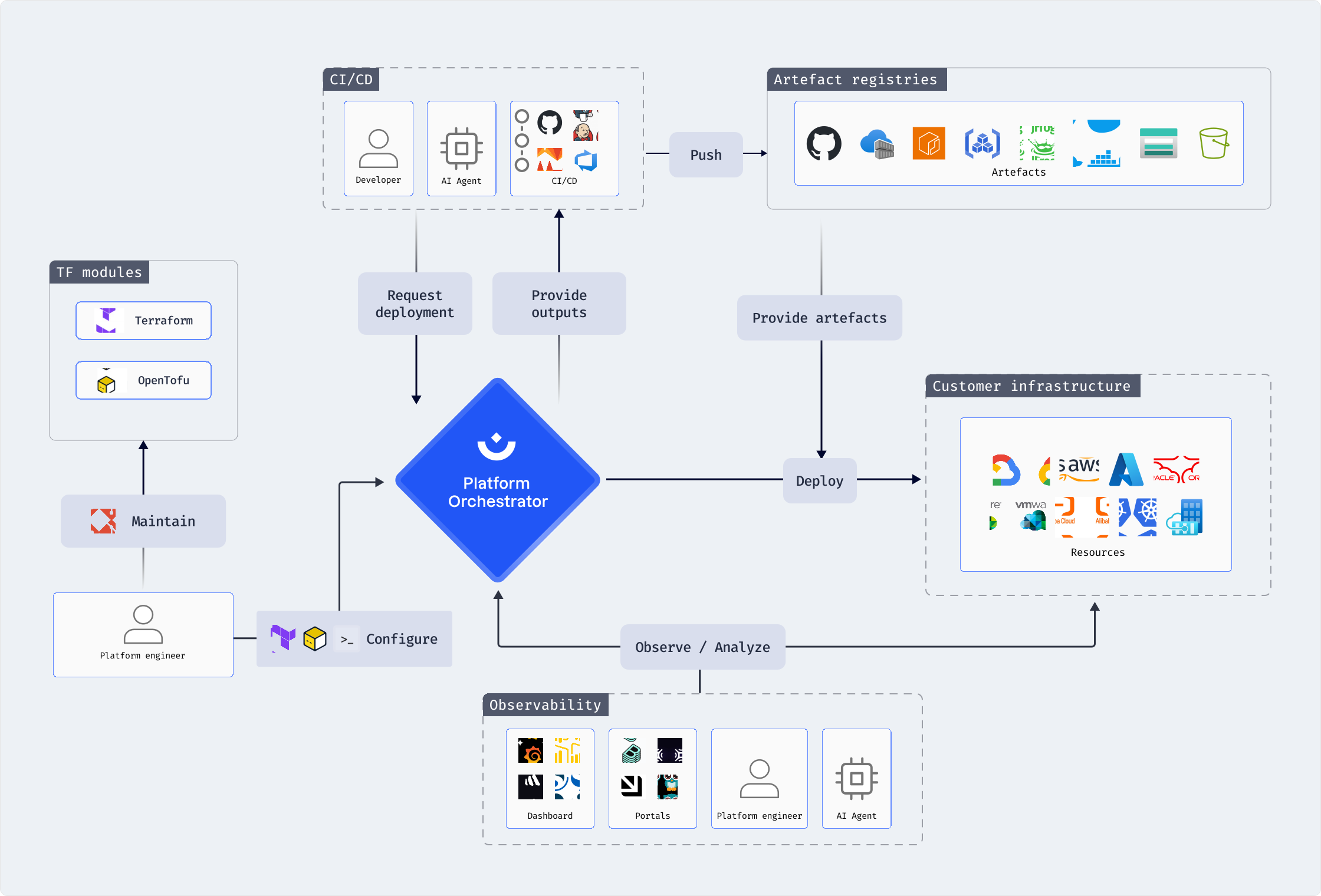
Artefact registries
The TF modules used by the Orchestrator during a deployment may need access to previously built artefacts stored in registries or general storage services depending on the nature of the artefacts, such as:
- Container images stored in an OCI registry
- Application package ZIP files stored in a storage bucket
- Helm charts stored in an OCI registry or Git repository
- LLM models stored as OCI artefacts in a registry
- etc.
The usage of the registries and artefacts is implemented in the TF code you provide in the modules executed by the Orchestrator.
To facilitate cross-environment usage of a module that is using artefacts from any registry, the artefact sources should be declared as a TF variable in that module, and then exposed as a module param in the surrounding Orchestrator module. The artefact source can thus be provided dynamically for each deployment.
For example, a TF module deploying a containerized workload can declare an image variable:
variable "image" {
  description = "Image source to use for the workload, e.g. my-registry.com/my-org/my-image:v1.2.3"
  type        = string
}
The Orchestrator module can then expose this variable as a module parameter:
resource "platform-orchestrator_module" "my_module" {
  # ...
  resource_type = my-workload-type
  module_params = {
    image = {
      type        = "string"
      description = "Image source to use for the workload"
    }
  }
}
With the module parameter exposed, it may be populated in manifests, or in module dependencies or co-provisioning:
Artifact parameter in manifest
# Manifest requesting a resource of the type requiring an artefact source
workloads:
  my-app:
    resources:
      my-workload:
        type: my-workload-type
        params:
          # Providing a value for the "image" module parameter
          image: my-registry.com/my-org/my-image:v1.2.3
          # Using placeholders for context-specific parameterization
          # image: my-registry.com/${context.project_id}/${context.env_id}/my-image:v1.2.3
Artifact parameter in module dependency
# Module snippet of a dependency to the type requiring an artefact source
resource "platform-orchestrator_module" "my_other_module" {
  # ...
  dependencies = {
    my-workload = {
      type   = "my-workload-type"
      params = {
        image = "my-registry.com/my-org/my-image:v1.2.3"
        # Using placeholders for context-specific parameterization
        # image = "my-registry.com/$${context.project_id}/$${context.env_id}/my-image:v1.2.3"
      }
    }
  }
}

Tip: using placeholders
You may use placeholder expressions to make artefact parameters context-aware if that is helpful in your setup. For example, use the ${context.project_id} and ${context.env_id} placeholders to structure your artefact storage and request the proper artefact for a deployment as shown in the code samples above.