Resource graph
The resource graph shows the dependencies between all active resources in an environment.
You will find a visual rendering of the resource graph in the Orchestrator console for each environment that has a deployment. It may look like this:
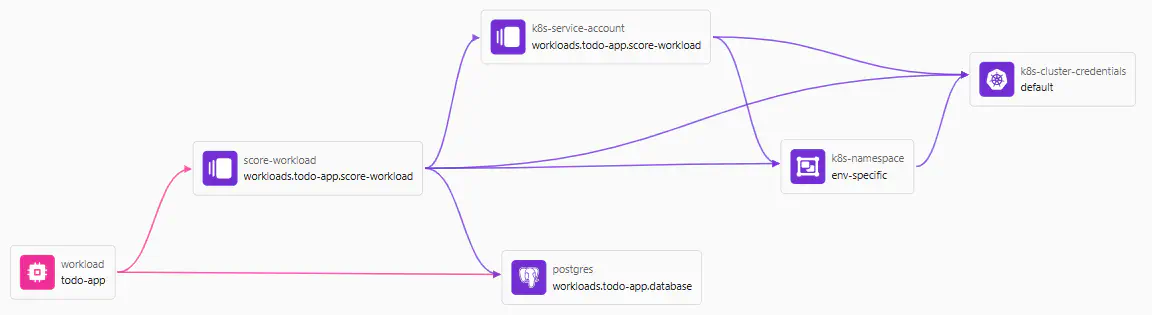
You can hold and drag nodes to rearrange them in the console view, and click on any node to see its details.
The Orchestrator constructs a resource graph for every new deployment, starting from the manifest being used and expanding it according to the setup of the modules as shown on this page.
The resource graph is directed and acyclic. Any configuration creating a cycle will cause the graph generation, and therefore the deployment, to fail.
Workloads and resources
All workloads in a manifest become root nodes in the graph. All child resources become dependent nodes of their parent workload.
# Manifest with one workload
# and two dependendent resources
workloads:
  todo-app:
    resources:
      database:
        type: postgres
      score-workload:
        type: score-workload
  another-app:
    resources:
      another-workload:
        type: score-workload
flowchart LR
    workload --> database(database<br/>resource_type: postgres)
    workload(todo-app<br/>resource_type: workload) --> score-workload(score-workload<br/>resource_type: score-workload)
    another-app(another-app<br/>resource_type: workload) --> another-workload(another-workload<br/>resource_type: score-workload)
Each node represents an “active resource” of a specific resource type and is based on a module.
The module used by an active resource may cause more nodes to be added to the graph by defining module dependencies or coprovisioned resources.
This dependencies declaration in a module…
resource "platform-orchestrator_module" "score_workload" {
  resource_type = "score-workload"
  dependencies = {
    namespace = {
      type = "k8s-namespace"
    }
  }
  # ...
}
… causes another resource of type k8s-namespace to be added to the graph.
flowchart LR
  workload(todo-app<br/>resource_type: workload) --> score-workload(score-workload<br/>resource_type: score-workload)
  workload --> database(database<br/>resource_type: postgres)
  score-workload --> resDefNamespace(k8s-namespace<br/>resource_type: k8s-namespace)

  %% Using the predefined styles
  class resDefNamespace highlight
The resource graph may therefore contain more nodes than there are elements defined in the manifest.

Shared resources
Shared resources from the manifest are basically added as root nodes to the graph. In practice, they will usually be referenced by another element like in this manifest, creating an edge between the two nodes.
# Sample manifest
workloads:
  sample-workload:
    outputs:
      # Referencing the shared-db resource
      DB_HOST: ${shared.shared-db.outputs.host}
shared:
  # This shared resource is being referenced
  shared-db:
    type: postgres
  # This shared resource is not referenced
  unreferenced-shared-db:
    type: postgres
flowchart LR
  workload(sample-workload<br/>resource_type: workload)
  workload --> shared-db(shared-db<br/>resource_type: postgres)
  unreferenced-shared-db(unreferenced-shared-db<br/>resource_type: postgres)

  %% Using the predefined styles
  class resDefNamespace highlight
Graph dependencies
An edge in the graph represents a dependency between two resources and has a direction.
A dependent resource must be provisioned before the depending resource. Dependencies inform the construction of the Terraform/OpenTofu module for a deployment.
flowchart LR
  resource1(This resource must be provisioned after...) --> resource2(...this dependent resource which must be provisioned after...) --> resource3(...this dependent resource)
These mechanisms create edges in the graph:
- Referencing the
outputsof a resource in the manifest - Referencing the
outputsof a resource in a module using placeholders - Referencing the
outputsof a resource in a provider using placeholders - Having
dependenciesin modules - Having
coprovisionedresources in modules (these may or may not add edges depending on the flags for eachcoprovisionedresource)
Terraform/OpenTofu dependency graph
Working with a dependency graph is also a core concept for Terraform and OpenTofu . The Orchestrator resource graph is not identical to that graph, though the two are related.
During a deployment, the Orchestrator constructs the resource graph first and then converts this internally into a Terraform/OpenTofu (“TF”) file (see what happens during a deployment) using the TF code referenced in the modules for each node. The TF executable then builds a dependency graph when running plan or apply on that file via a runner.
Since an Orchestrator module may contain any number of TF resources, the TF dependency graph will usually be more fine-grained than the Orchestrator resource graph. Also, the Orchestrator resource graph nodes are typed using the resource types defined on the Orchestator level such as postgres, whereas the TF resources are typed using those resources that the TF provider(s) define such as aws_db_instance.
Active resources
Each node in the resource graph represents an active resource. You can query the details of all active resources in an environment by selecting a node in the console view or by using this command:
hctl get active-resource-nodes my-project my-environment -o yaml # or "-o json" for JSON output
The properties of each active resource include its resource type, its project, environment, and deployment, as well as the module used to provision it.
Each active resource also has a resource class and resource ID. Find more details on these properties further down.
Resource uniqueness
The resource ID alone does not make an active resource necessarily unique in the graph.
The resource type, resource class, and resource ID together uniquely identify an active resource within a resource graph.
An active resource also has a non-semantic unique id property.
Resource class
Every active resource has a resource class. If not specified otherwise when requesting the resource, the class is default.
Resource classes provide a way of optionally providing different flavors of a resource type in your platform.
Example: bucket classes
There might be multiple flavors of S3 bucket available:
- An
externalS3 bucket that is open to the public internet, e.g. to allow for downloading of assets - A
sensitiveS3 bucket that is encrypted and only accessible via a limited set of roles, e.g. for storing confidential data - A
volatileS3 bucket with a retention time is less than 24 hours, e.g. for holding intermediate data from other processes
To make these classes available, platform engineers configure a module and a corresponding module rule matching a class. There is no standalone resource class definition.
# Module rule mapping the "sensitive" class to a particular S3 bucket module
resource "platform-orchestrator_module_rule" "s3-sensitive" {
  module_id      = platform-orchestrator_module.s3_sensitive.id
  resource_class = "sensitive"
}
The module referenced in the module_id will then have to implement this class appropriately, in this case by configuring the S3 bucket to be as “sensitive” as required.
Example: database sizes
There might be multiple sizes of PostgreSQL databases available: S, M, L, and XL. Each class may define a different storage size, vCPU allocation, and other parameter settings that make up a size class.
Using resource classes in manifests
With module and module rule in place, developers can request a specific class of a resource alongside the type in a manifest.
# Manifest requesting an S3 bucket
# and a postgres database
# of a particular class
workloads:
  sample-workload:
    resources:
      bucket:
        type: s3
        class: sensitive
      db:
        type: postgres
        class: L
flowchart LR
    workload(sample-workload<br/>resource_type: workload<br/>resource_class: default) --> bucket(bucket<br/>resource_type: s3<br/>resource_class: sensitive)
    workload --> db(db<br/>resource_type: postgres<br/>resource_class: L)
Using resource classes in modules
Platform engineers can also use resource classes when expanding the resource graph through module dependencies or module coprovisioning:
# Using a resource class in a dependency
resource "platform-orchestrator_module" "some_module" {
  # ...
  dependencies = {
    postgres = {
      type  = "s3"
      class = "sensitive"
    }
  }
}
# Using a resource class in coprovisioning
resource "platform-orchestrator_module" "some_module" {
  # ...
  coprovisioned = [
    {
      type  = "s3"
      class = "sensitive"
    }
  ]
}
See resource classes in dependencies for more options when working with classes.
Resource ID
Every active resource has a resource ID. Unless specified otherwise, the resource ID is:
- The workload name for a
workloadin the manifest workloads.<workload-name>.<resource-name>for theresourcesof a workload in the manifest- The inherited resource ID of the parent resource for any resource created via module
dependenciesor modulecoprovisioning shared.<resource-name>for theshared-resourcesin the manifest
Resource IDs serve to structure the resource graph into logical sub-segments through a common ID, or help uniquely identify a particular resource.
The resource ID alone does not make an active resource necessarily unique in the graph.
The resource type, resource class, and resource ID together uniquely identify an active resource within a resource graph.
An active resource also has a non-semantic unique id property.
Example: inherited resource ID
Given this manifest…
workloads:
  sample-workload:
    resources:
      vm-deployment-1:
        type: vm-deployment
      vm-deployment-2:
        type: vm-deployment
… and the module for the vm-deployment coprovisioning a dependent role resource:
resource "platform-orchestrator_module" "vm_deployment" {
  id            = "vm-deployment"
  coprovisioned = [
    {
      type                    = "role"
      is_dependent_on_current = true
    }
  ]
  # ...
}
The resource graph will look like this:
flowchart LR
    role1(role-1<br/>resource_id: workloads.sample-workload.vm-deployment-1) -->|Coprovisioned by| vm-deployment-1
    workload(sample-workload<br/>resource_id: workload) --> vm-deployment-1(vm-deployment-1<br/>resource_id: workloads.sample-workload.vm-deployment-1)
    workload --> vm-deployment-2(vm-deployment-2<br/>resource_id: workloads.sample-workload.vm-deployment-2)
    role2(role-2<br/>resource_id: workloads.sample-workload.vm-deployment-2) -->|Coprovisioned by| vm-deployment-2
Note that the role resources have each inherited the resource ID from the coprovisioning vm-deployment resource.
Example: segmenting the graph through ID inheritance
Given this resource graph where the two highlighted resources share the same resource ID through inheritance:
flowchart LR
    workload(Workload<br/>type: workload<br/>class: default<br/>ID: main) --> type1(Type 1<br/>type: type1<br/>class: default<br>ID: workloads.main.type-1)
    workload --> type2(Type 2<br/>type: type2<br/>class: default<br>ID: workloads.main.type-2)
    type2 --> type3_1(Type 3-1<br/>type: type3<br/>class: default<br>ID: my-type-3)
    type2 --> type3_2("Type 3-2<br/>type: type3<br/>class: default<br>ID: workloads.main-type-2<br/>(inherited ID)")

    class type2,type3_2 highlight
    linkStyle 0,1,3 stroke:#2156f6,stroke-width:4px
Here, the module for type1 can use a selector placeholder to look up only the type3 resource having the inherited ID of its type2 parent by using the @ (“same”) symbol:
${select.consumers('workload').dependencies('type2').dependencies('type3#@').outputs.some_output}
See resource IDs in dependencies for more options when working with IDs.
Resource uniqueness
The resource ID alone does not make an active resource necessarily unique in the graph.
The resource type, resource class, and resource ID together uniquely identify an active resource within a resource graph.
An active resource also has a non-semantic unique id property.
Reading and passing values between resources
Resources may read outputs from other resources in the graph by using resource placeholders and selector placeholders.
Resources may pass values to other resources through resource params in module dependencies or module coprovisioning.